1. 仕様
2. 設計
2.1. TODOリスト
-
❏ TODO
-
✓ TODO DONE
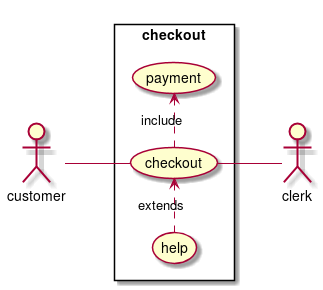
2.2. ユースケース図
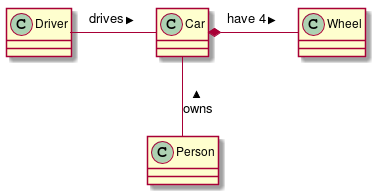
2.3. クラス図
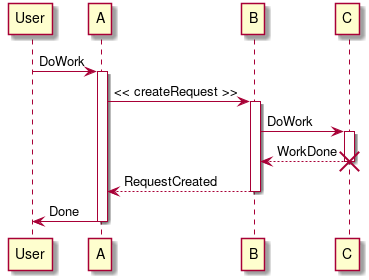
2.4. シーケンス図
3. 実装
using System;
using System.Collections.Generic;
using System.Linq;
using System.Threading.Tasks;
using System.Net.Http;
using System.Net.Http.Headers;
using Newtonsoft.Json;

using Amazon.Lambda.Core;
using Amazon.Lambda.APIGatewayEvents;

// Assembly attribute to enable the Lambda function's JSON input to be converted into a .NET class.
[assembly: LambdaSerializer(typeof(Amazon.Lambda.Serialization.Json.JsonSerializer))]

namespace HelloWorld
{

    public class Function
    {

        private static readonly HttpClient client = new HttpClient();

        private static async Task<string> GetCallingIP()
        {
            client.DefaultRequestHeaders.Accept.Clear();
            client.DefaultRequestHeaders.Add("User-Agent", "AWS Lambda .Net Client");

            var stringTask = client.GetStringAsync("http://checkip.amazonaws.com/").ConfigureAwait(continueOnCapturedContext:false);

            var msg = await stringTask;
            return msg.Replace("\n","");
        }

        public APIGatewayProxyResponse FunctionHandler(APIGatewayProxyRequest apigProxyEvent, ILambdaContext context)
        {

            string location = GetCallingIP().Result;
            Dictionary<string, string> body = new Dictionary<string, string>
            {
                { "message", "hello world" },
                { "location", location },
            };

            return new APIGatewayProxyResponse
            {
                Body = JsonConvert.SerializeObject(body),
                StatusCode = 200,
                Headers = new Dictionary<string, string> { { "Content-Type", "application/json" } }
            };
        }
    }
}
using System;
using System.Collections.Generic;
using System.Linq;
using System.Threading.Tasks;
using System.Net.Http;
using System.Net.Http.Headers;
using Newtonsoft.Json;
using Xunit;
using Amazon.Lambda.Core;
using Amazon.Lambda.TestUtilities;
using Amazon.Lambda.APIGatewayEvents;
namespace HelloWorld.Tests
{
public class FunctionTest
{
private static readonly HttpClient client = new HttpClient();
private static async Task<string> GetCallingIP()
{
client.DefaultRequestHeaders.Accept.Clear();
client.DefaultRequestHeaders.Add("User-Agent", "AWS Lambda .Net Client");
var stringTask = client.GetStringAsync("http://checkip.amazonaws.com/").ConfigureAwait(continueOnCapturedContext:false);
var msg = await stringTask;
return msg.Replace("\n","");
}
[Fact]
public void TestHelloWorldFunctionHandler()
{
TestLambdaContext context;
APIGatewayProxyRequest request;
APIGatewayProxyResponse response;
request = new APIGatewayProxyRequest();
context = new TestLambdaContext();
string location = GetCallingIP().Result;
Dictionary<string, string> body = new Dictionary<string, string>
{
{ "message", "hello world" },
{ "location", location },
};
var ExpectedResponse = new APIGatewayProxyResponse
{
Body = JsonConvert.SerializeObject(body),
StatusCode = 200,
Headers = new Dictionary<string, string> { { "Content-Type", "application/json" } }
};
var function = new Function();
response = function.FunctionHandler(request, context);
Console.WriteLine("Lambda Response: \n" + response.Body);
Console.WriteLine("Expected Response: \n" + ExpectedResponse.Body);
Assert.Equal(ExpectedResponse.Body, response.Body);
Assert.Equal(ExpectedResponse.Headers, response.Headers);
Assert.Equal(ExpectedResponse.StatusCode, response.StatusCode);
}
}
}4. 参照
-
PlantUML[http://plantuml.com]